JetBrains HTTP Better Than Postman
A plain .http file in Rider replaced Postman, Fiddler, Thunder Client, and curl for manually poking at my APIs. Here is the whole workflow against a real .NET API with JWT auth, from the first confusing error to running the same requests against production.
Everyone needs to call an API by hand sometimes. You can use curl, which ships with macOS and Linux and comes along with Git for Windows. You can use Postman on any OS, or Fiddler on Windows. For a while I paid for Thunder Client inside VS Code because it was convenient.
Then I noticed the tool I actually wanted was already installed. Every JetBrains IDE ships an HTTP Client that runs requests straight from a text file, and for me it beats all of the above. This post walks through the demo I recorded: a small event-sourced .NET API, a handful of .http files, and DataGrip to prove what landed in the database. The source is on GitHub.
Why not the usual suspects
Postman and Fiddler are fine, but they live outside the editor, and some of them make the raw request and response surprisingly hard to find. Thunder Client is closer to what I want, but it is a paid subscription on top of everything else and the license caps you at three machines. If you work across virtual machines and a couple of desktops, you end up deactivating installs to stay under the limit.
JetBrains does not do any of that. You sign in everywhere you work. The whole suite runs me about twenty dollars a month, which is less than Thunder Client cost me, and you can rent a single IDE instead if that is all you need. Buy a year outright and you keep a perpetual license for that version even if you stop paying. Several of the IDEs, including Rider, WebStorm, and PyCharm, now have free non-commercial or community editions, and the HTTP Client comes with all of them.
The demo API
The API under test is a .NET 10 minimal API with JWT authentication, built the way I build everything: CQRS with event sourcing. There is a command, POST /api/tasks, that appends a TaskCreated event. There is a query, GET /api/tasks, that folds those events into a read model and supports search, status filtering, and pagination. SQLite holds exactly two tables: events, the append-only write model, and sessions for logins. If you want to go deeper on that style, look up the practitioners of Event Modeling; it is a very particular way of designing an application and it is worth learning properly.
None of the request files were typed by hand. I know how the HTTP Client works, so I asked an LLM to “create a JetBrains .http file that logs in and then calls these endpoints” and it produced them. Free or paid, any of the current models will do this for you.
A request is just a text file
Here is the login request. Three hashes start a request, @name labels it, and the block after > {% ... %} is a response handler that stashes the returned token in a global variable so you can experiment with it.
### Log in explicitly (also useful to replace an expired JWT)
# @name login
POST {{baseUrl}}/auth/login
Content-Type: application/json

{
  "username": "{{username}}",
  "password": "{{password}}"
}

> {% client.global.set("jwt", response.body.token); %}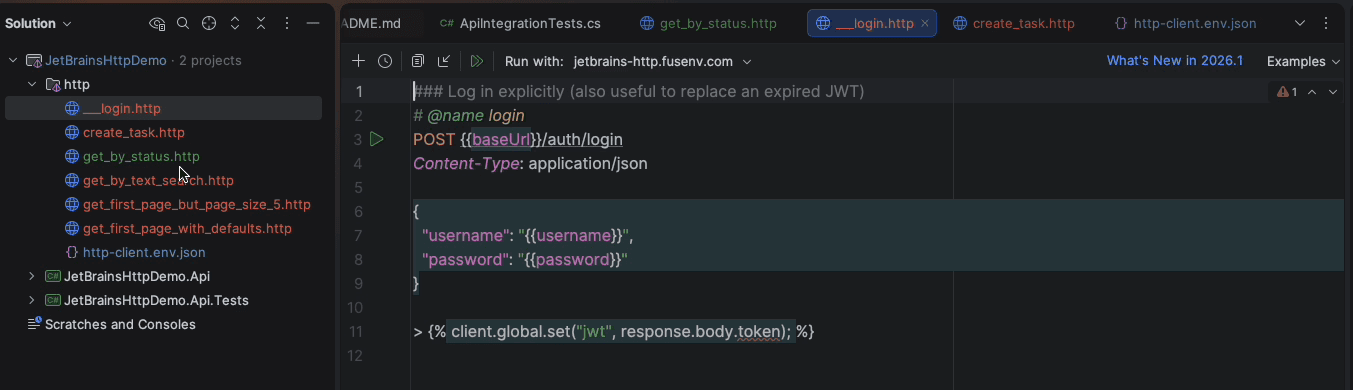
Every {{...}} placeholder comes from an environment, and that is the first thing that trips people up.
The first thing you will hit: no environment
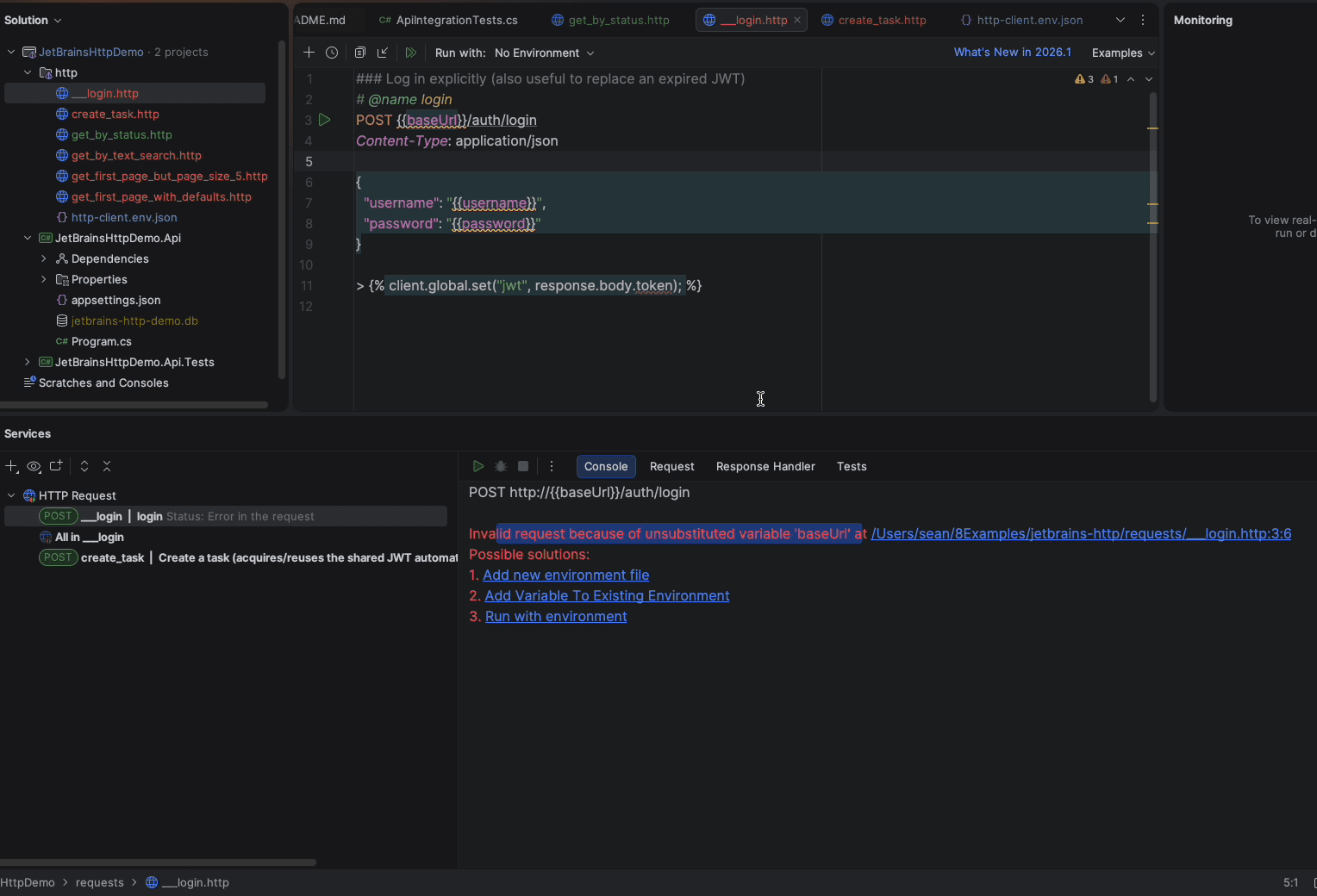
I deliberately ran the login with No Environment selected to show what you will see on day one. The client refuses the request because it cannot substitute baseUrl, and it offers three fixes inline: add an environment file, add the variable to an existing one, or run with an environment.
Environments live in http-client.env.json next to the request files. Name them whatever you like; I called this one local, it could just as easily be dev. The variables are whatever your API needs, nothing more.
{
  "local": {
    "baseUrl": "http://localhost:5050",
    "username": "demo",
    "password": "demo-password",
    "Security": {
      "Auth": {
        "demo-jwt": {
          "Type": "OAuth2",
          "Grant Type": "Password",
          "Token URL": "{{baseUrl}}/auth/login",
          "Client ID": "jetbrains-http-client",
          "Client Credentials": "none",
          "Username": "{{username}}",
          "Password": "{{password}}"
        }
      }
    }
  }
}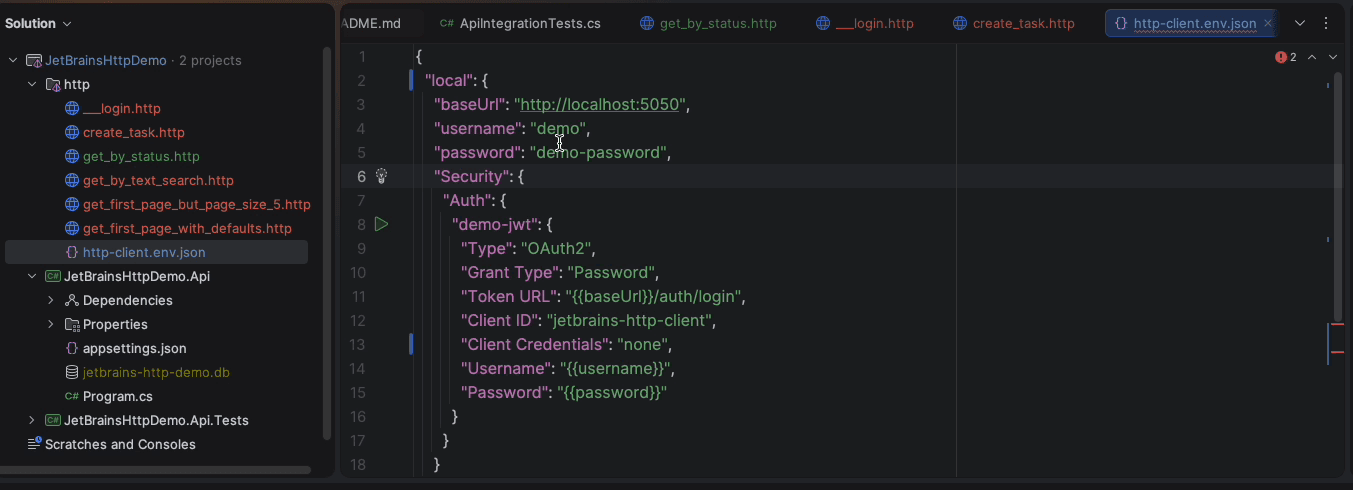
The interesting part is the Security.Auth block. It declares an OAuth2 password-flow configuration called demo-jwt that points at my login endpoint. Any request that says Authorization: Bearer {{$auth.token("demo-jwt")}} gets a JWT fetched automatically the first time and reused until it expires. No copying tokens between tabs.
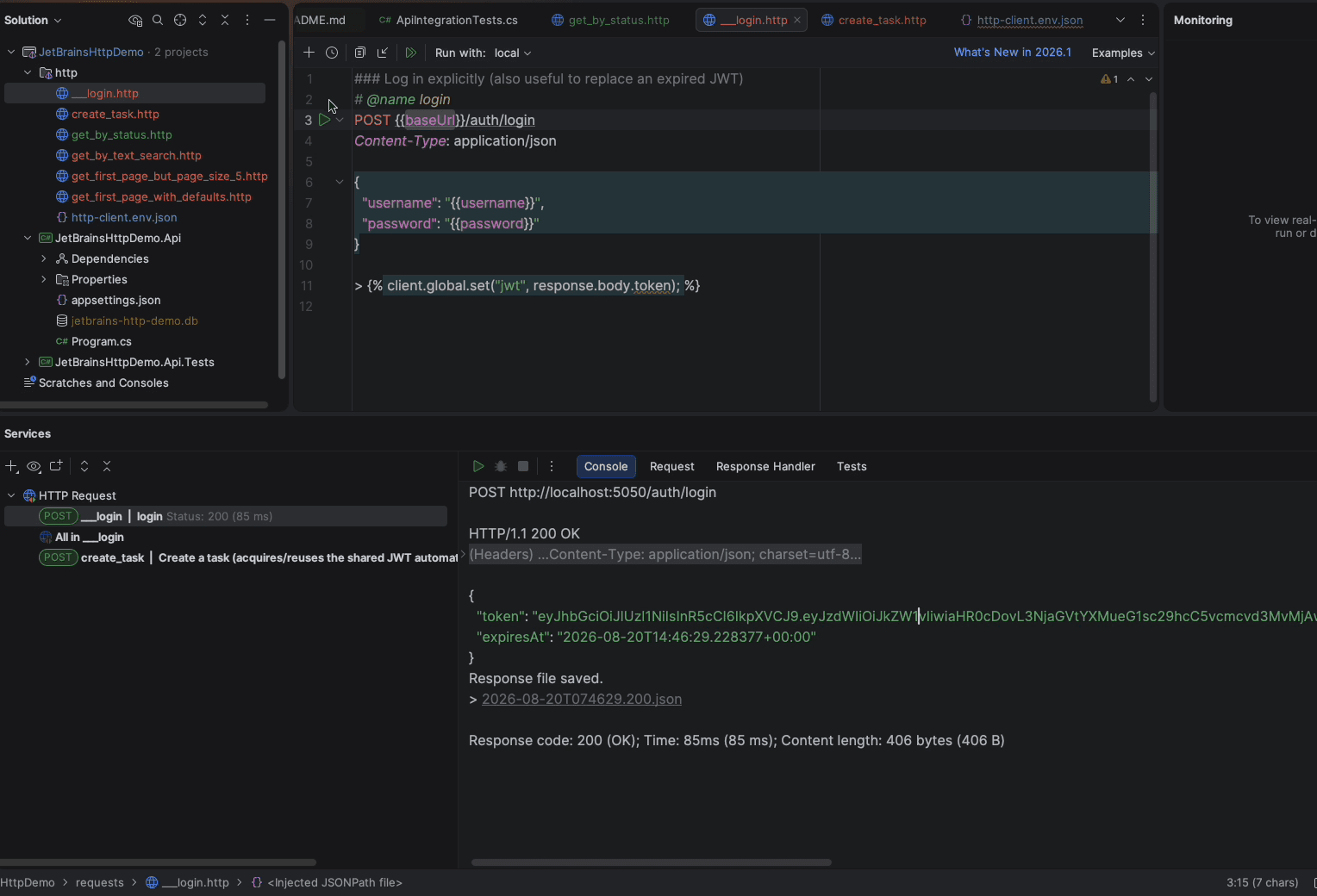
Pick local from the Run with dropdown, run the login again, and it comes back with a token.
Run a command
Now an authenticated call. I put a run of eights in the title so I can recognise the record later.
### Create a task (acquires/reuses the shared JWT automatically)
POST {{baseUrl}}/api/tasks
Authorization: Bearer {{$auth.token("demo-jwt")}}
Content-Type: application/json

{
  "title": "88888 Learn the JetBrains HTTP Client",
  "description": "Invoke an authenticated CQRS command"
}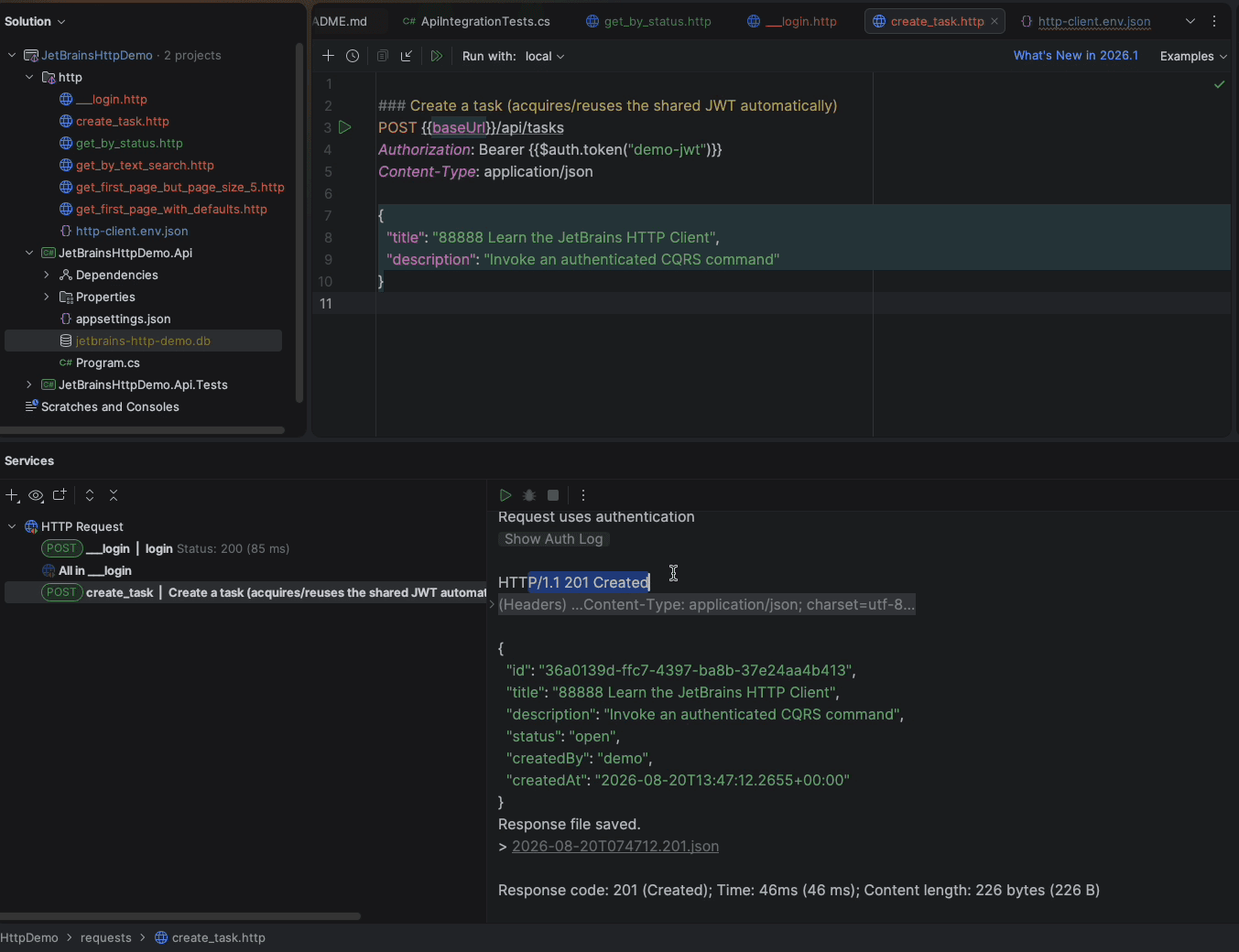
Notice how much is on screen: the status line, a collapsible header block, the body, the elapsed time, the content length, and a link to the saved response file. Some tools hide the raw exchange or make you dig for it. Here the outgoing and incoming headers are one click away, which is exactly what you want when something is subtly wrong.
Prove it in the database
The twenty dollars also buys DataGrip, which connects to just about any database. I had it pointed at the demo SQLite file, so I ran a query against the event store to see the write model directly.
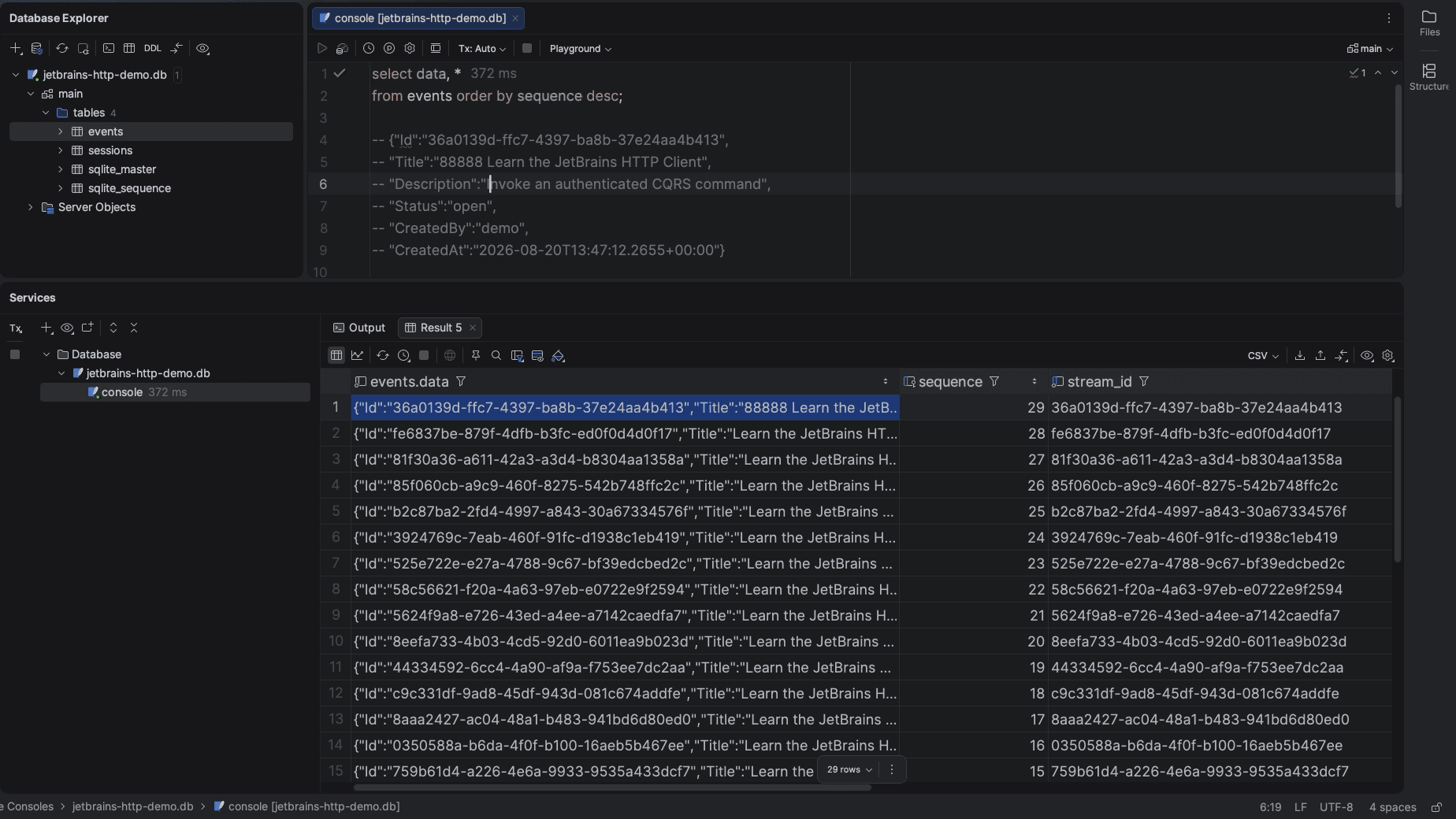
There it is at the top of the table: the title with the eights, the description, the status the workflow starts every task in (open), who created it, and when. In CQRS terms the command was valid, so it emitted one event, and the event is the truth. Everything the query endpoint returns is a projection of rows like this one.
Run the queries
The read side has three request files: filter by status, free-text search across title and description, and plain pagination. They are one-liners.
### Query: status filter
GET {{baseUrl}}/api/tasks?status=open&page=1&pageSize=3
Authorization: Bearer {{$auth.token("demo-jwt")}}

### Query: free-text filter (title and description)
GET {{baseUrl}}/api/tasks?search=888&page=1&pageSize=10
Authorization: Bearer {{$auth.token("demo-jwt")}}

### Query: pagination
GET {{baseUrl}}/api/tasks?page=1&pageSize=5
Authorization: Bearer {{$auth.token("demo-jwt")}}
You will forget to select the environment on the first run of each file. I did, repeatedly, on camera. Eventually it becomes muscle memory. I also managed to break every request at once with a stray comma in the environment JSON, which is the other thing to check when everything suddenly fails.
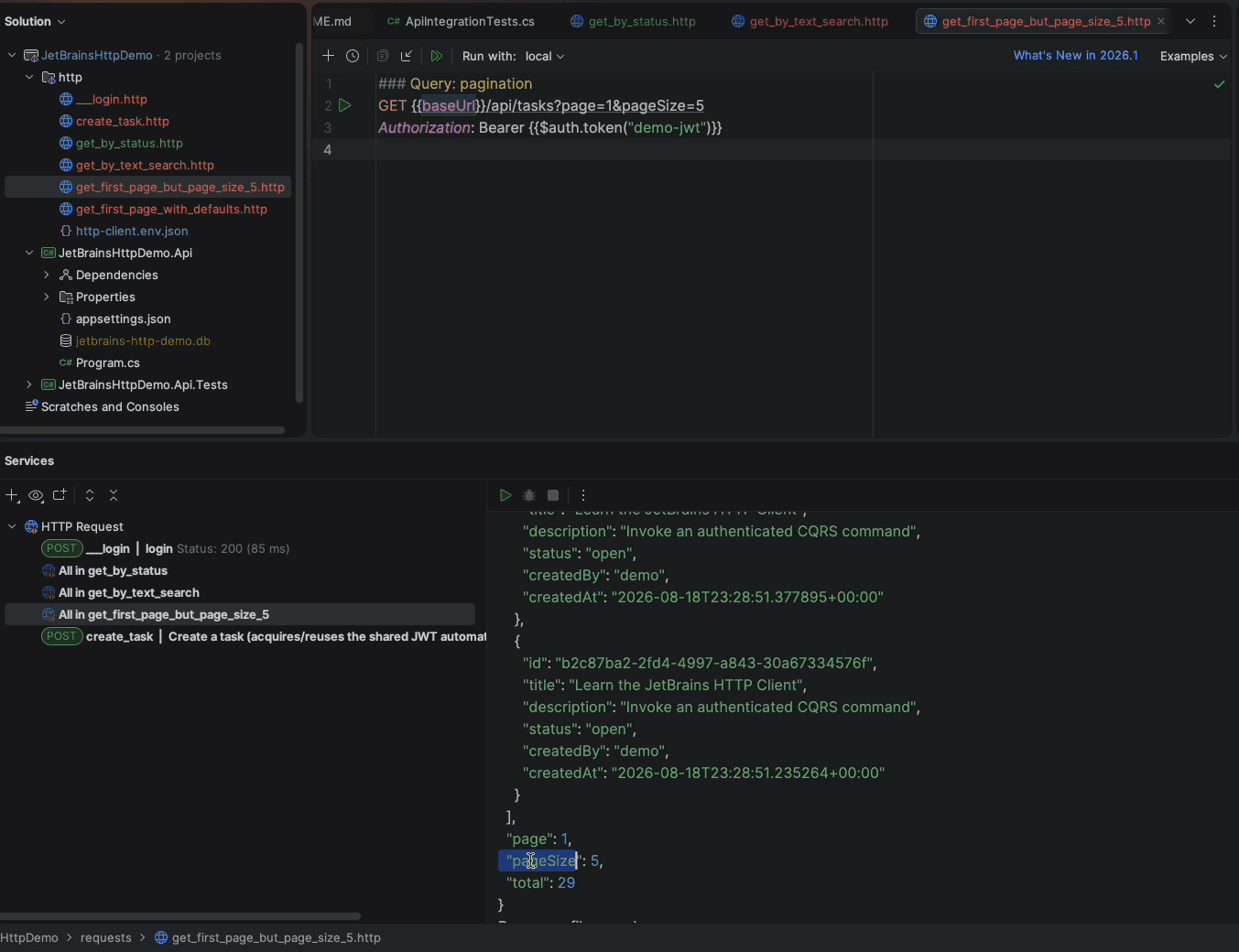
The search for 888 returned exactly the one task I created. The status filter returned everything still open. Pagination returned five of twenty-nine with the totals alongside. Nothing clever, just fast to run and easy to tweak.
Point the same files at production
This is where the environment file earns its keep. The API is also deployed to my home lab. GitHub Actions builds the Docker image, pushes it to the GitHub container registry, and fires a repository dispatch to a separate devops repo. That repo runs a self-hosted runner on a mini PC, pulls the latest image, replaces the running container, and mounts a volume for the SQLite file so the data survives every replacement. A Cloudflare tunnel maps a subdomain to that container’s port on the LAN and handles HTTPS for free.
To call it, I duplicated the local block and changed one value.
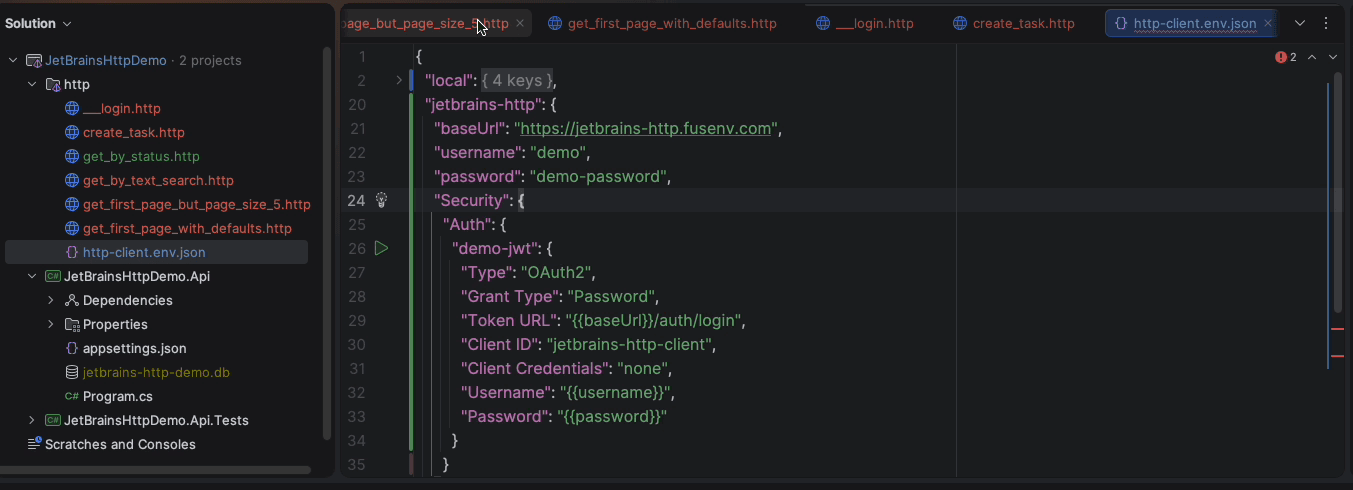
To make it obvious which one I was hitting, I stopped the local API first. Running the login with local selected fails exactly the way it should.
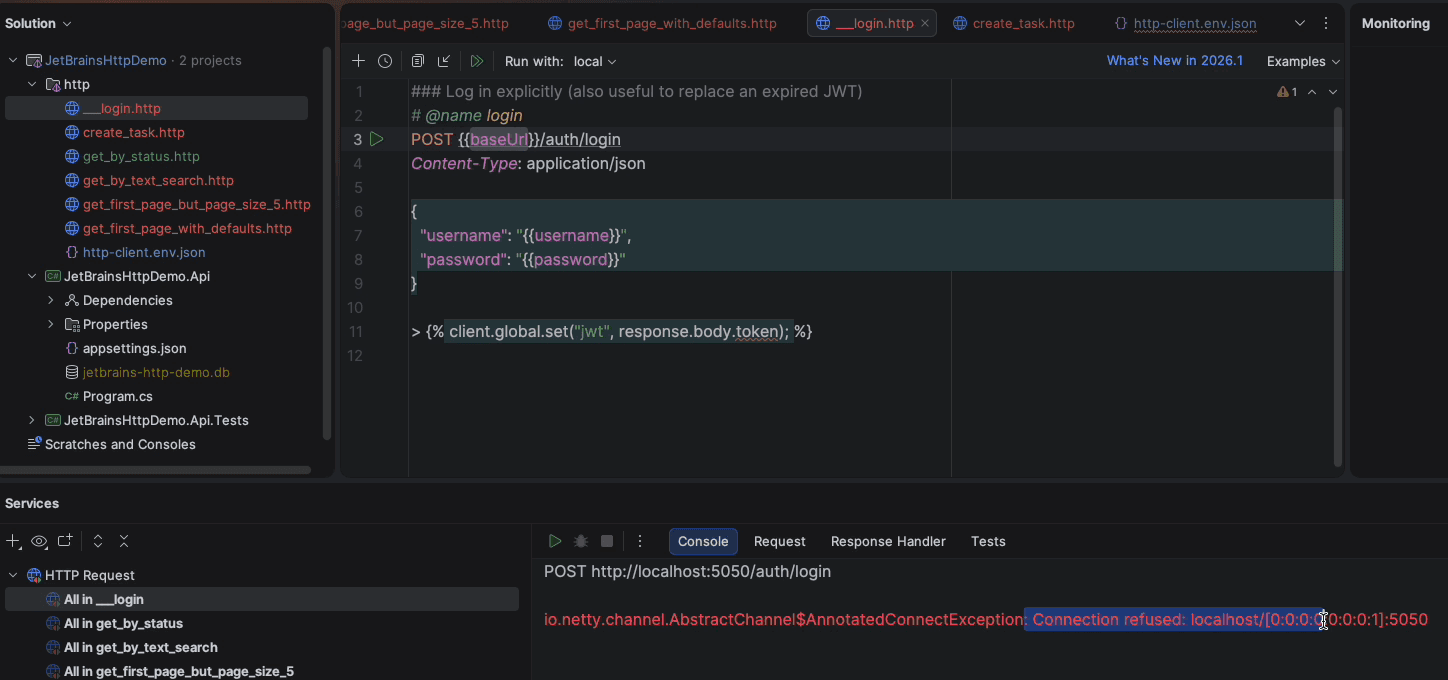
Switch the dropdown to the new environment and run the same file again.
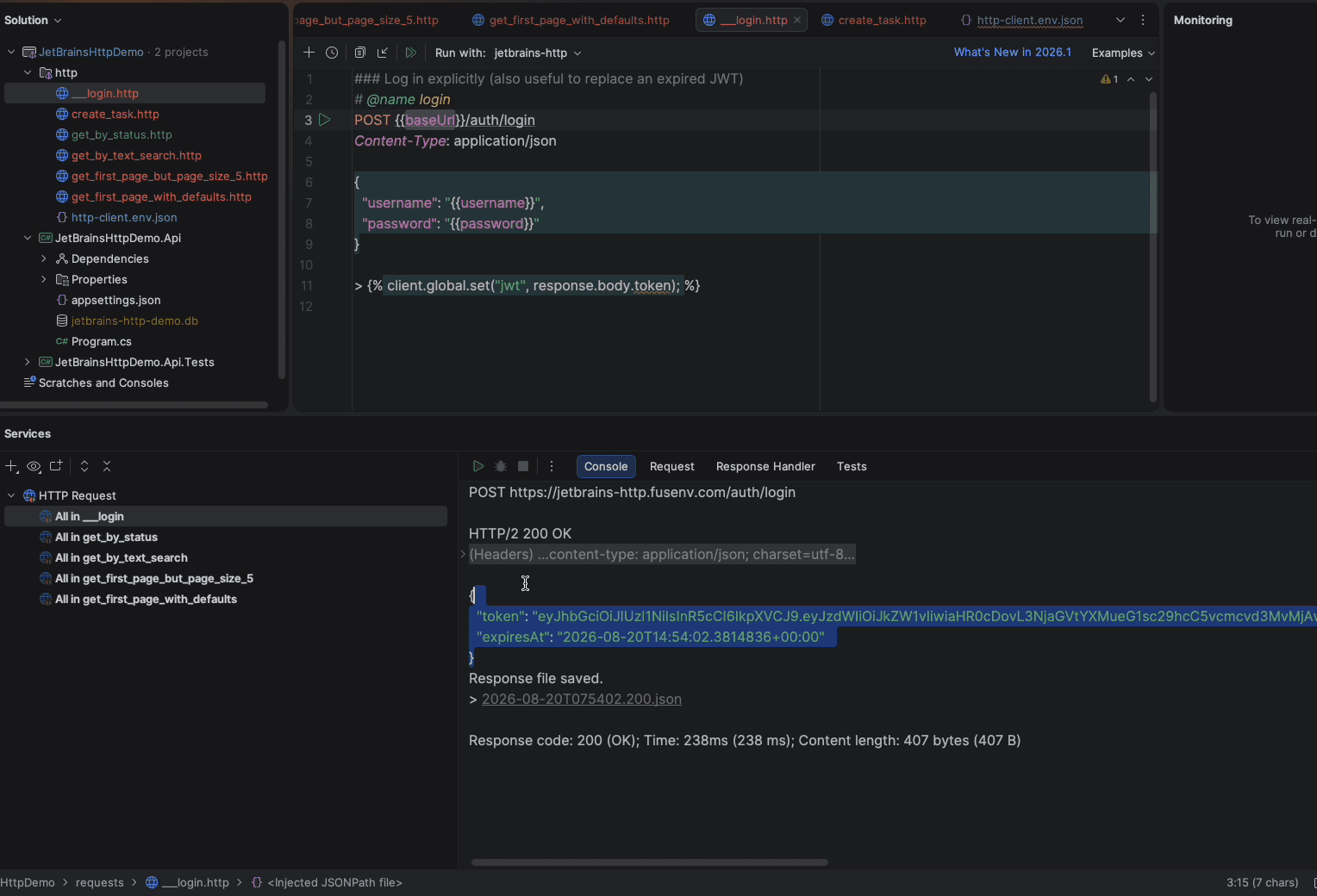
I then created a task with a run of sevens through the public endpoint. Back in DataGrip against the local database, the sevens are nowhere to be found, which is the proof I wanted: the write went to the production SQLite file, not the one on my laptop. Two environments, zero duplicated requests.
Poke at the error paths
Manual testing is mostly about trying the wrong thing on purpose. I copied the create request, renamed title to title2, and ran it against production.
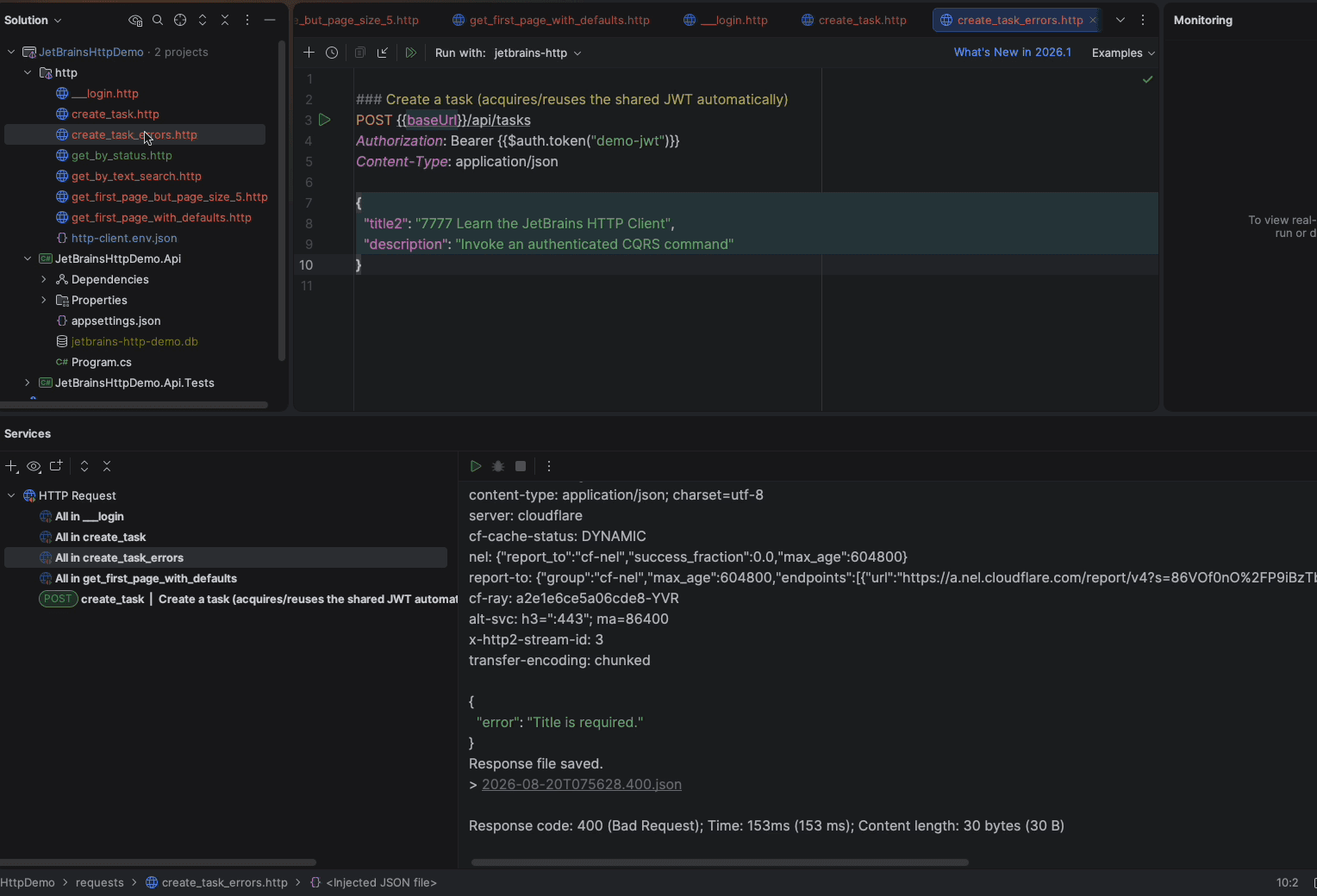
That is the whole loop: write a request, run it, read the raw response, check the database, adjust, repeat. It is a smoke test you can do in thirty seconds without leaving the IDE.
To be clear about what this is not: it is not a substitute for automated integration tests. The demo repo has an xUnit suite that boots the real API in memory with an isolated database per test. The .http files are for the exploratory poking that happens before and around those tests.
Rough edges
- Rider works from the solution file, so a new
.httpfile created outside the solution does not appear until you include it. I cheated and duplicated the file in WebStorm, which treats the folder as a plain directory. There is surely a cleaner way; I did not bother finding it. - You will forget to choose the environment. The error message is clear, so it costs you five seconds each time.
- The environment file is JSON and JSON is unforgiving. One trailing comma takes every request down with it.
Verdict
For manually invoking an API, this is better than curl, better than Postman, better than Fiddler, and better than Thunder Client, and it is included with every JetBrains IDE. Visual Studio has something similar; this one is better than that too. The requests are plain text, so they live in the repo, diff cleanly, and travel with the code. Environments make the same file work against local, staging, and production. And when you want to know exactly what went over the wire, it is all right there.
Text file → pick an environment → run → read the raw response → check the database → adjust. No separate app, no token juggling, no per-machine license count.
The demo API, the request files, and the environment file are all in the jetbrains-http repository on GitHub. Clone it, run dotnet run --project src/JetBrainsHttpDemo.Api, open the requests folder in any JetBrains IDE, pick local, and start poking. Or skip the clone: the jetbrains-http environment in that same file points at the live deployment at jetbrains-http.fusenv.com with the demo credentials, so you can run every request in this post against my home lab without starting anything.
Comments 0
No comments yet. Start the conversation.