Connect OpenClaw to Xero and Let It Do the Books
Yesterday I could not get past Xero’s developer portal. Today the integration is live: a managed OpenClaw can read and write your Xero books through a gateway that 8Examples runs, and you switch it on from the worker’s menu in your account.
Bookkeeping is the job most small businesses would hand to a worker first. It is repetitive, it has a source of truth, and it has a definition of done: the bank balance in the books equals the bank balance on the statement. That makes it a good first accounting job for an AI worker, as long as the worker is given access in a way the owner can understand, limit, and take back.
This post covers three things: what the Xero gateway does and how it is built, how to connect Xero to an OpenClaw you already have, and a walkthrough of a month-end reconciliation over Telegram.
What the worker can do in Xero
The connection asks Xero for the working set of bookkeeping permissions: invoices, payments, bank transactions, manual journals, contacts, attachments, and settings, plus read access to budgets and the standard reports (aged receivables and payables, balance sheet, bank summary, budget summary, executive summary, profit and loss, trial balance, and tax). The Files, Assets, and Projects APIs are included. Xero’s restricted journal-read scope is deliberately left out, because Xero gates it behind a separate approval and nothing here needs it.
In practice that means the worker can raise and send invoices, record the payments that come in, create spend and receive money transactions from receipts, attach the source documents to them, keep contacts tidy, and pull the month-end reports. It cannot touch anything outside the organisation you authorized, and every call it makes is written down.
Connecting Xero to a worker you already have
Sign in at 8examples.com/account. Every worker has a card, and the card’s menu now has a Connect Xero… entry.
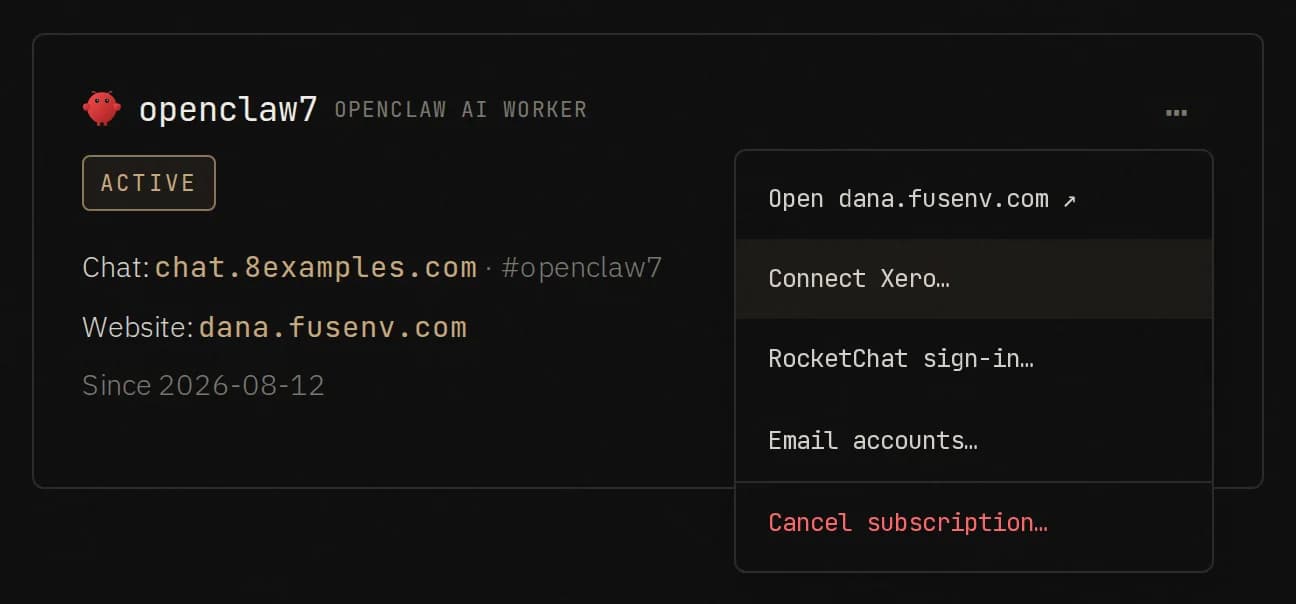
- Choose Connect Xero…. You are sent to Xero’s own sign-in page.
- Sign in to Xero, pick the organisation the worker may use, and approve the permissions. Xero shows the full list before you say yes.
- Xero sends you back to 8examples.com, which shows a one-time access key for this worker.
- Paste the key and the discovery URL into the worker’s chat. That is the whole handover.
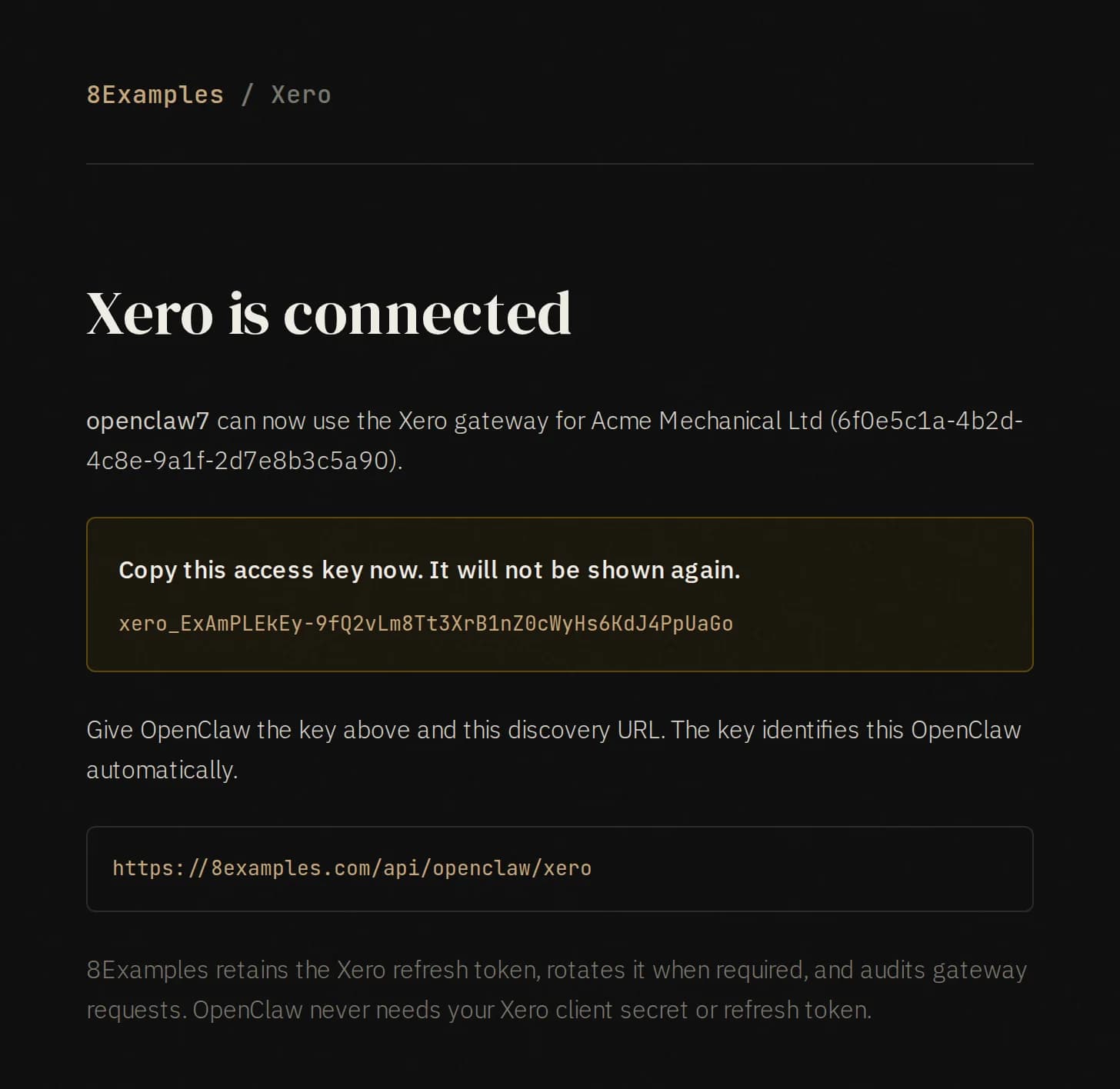
The key is the only credential the worker ever holds. It does not get your Xero password, the OAuth client secret, or the refresh token. The discovery URL, https://8examples.com/api/openclaw/xero, is a public JSON document that tells the worker how the gateway works: where to send requests, how to pick a tenant, how to check its connection, and how to disconnect. A worker that reads it knows what to do without any further setup.
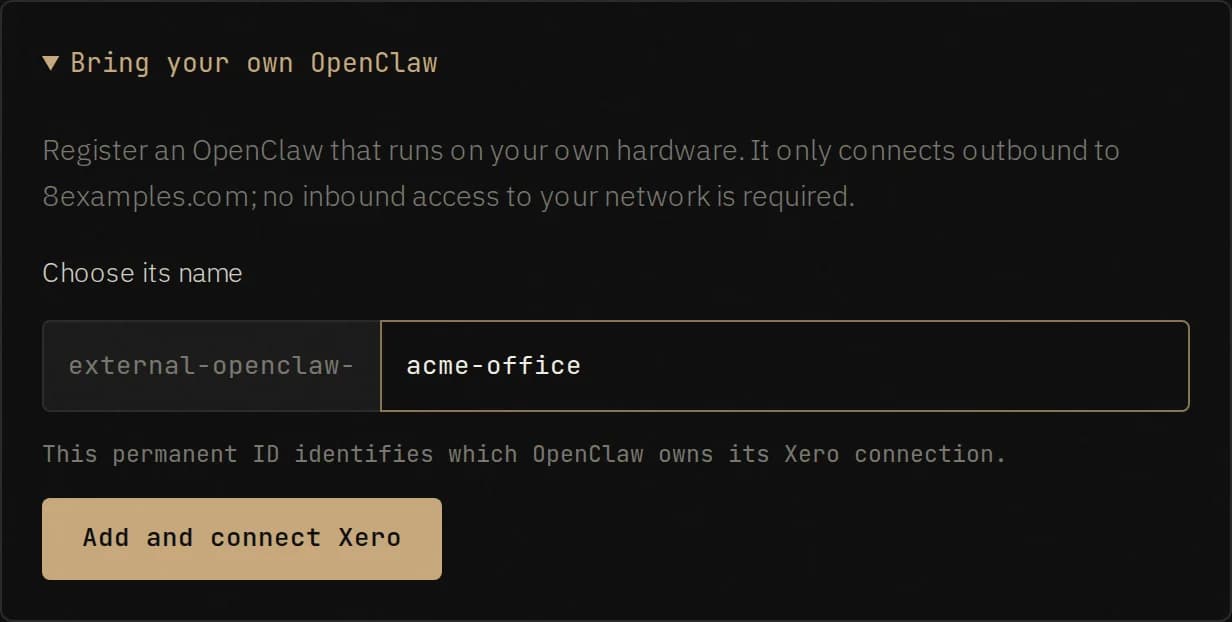
If your OpenClaw runs on your own hardware instead of the 8Examples fleet, the same page has a Bring your own OpenClaw panel. Give the worker a permanent name and it gets the same Xero flow. The worker only ever connects outbound to 8examples.com, so nothing has to be opened on your network.
How the gateway is built
The worker never talks to Xero directly. It talks to 8examples.com, which holds the Xero tokens and forwards the request. That one design choice is where most of the safety comes from, so here is what sits behind it.
Authorization. Connect Xero starts a standard OAuth authorization-code flow. The state parameter is signed, expires in ten minutes, carries a random nonce, and is bound to a short-lived cookie scoped to the callback path. The nonce is recorded when the flow starts and consumed exactly once when Xero calls back, so a replayed or forged callback fails before any token exchange happens. The callback then exchanges the code, reads the organisations you authorized, and records the connection.
Tokens at rest. The access and refresh tokens are encrypted with AES-256-GCM before they are written to the events table, under a key that lives only in the server environment. The gateway key you paste into the worker is 32 random bytes; the server keeps an HMAC of it and nothing else, so a copy of the database does not yield working keys.
Requests. The worker calls /api/openclaw/xero/ followed by the Xero path it wants, with its key as a bearer token. The gateway resolves the key to a connection, refuses anything outside Xero’s Accounting, Files, Assets, and Projects APIs, caps bodies at 25 MB, picks the first authorized organisation unless an X-Xero-Tenant-Id header names another one it is allowed to use, and forwards the call with a valid access token. Idempotency-key headers pass straight through, and Xero’s rate-limit headers come straight back, so a careful worker can behave well.
# What the worker does, minus the discovery step
curl "https://8examples.com/api/openclaw/xero/api.xro/2.0/Invoices?page=1" \
  -H "Authorization: Bearer xero_…"

# Any Xero write works the same way
curl -X PUT "https://8examples.com/api/openclaw/xero/api.xro/2.0/BankTransactions" \
  -H "Authorization: Bearer xero_…" \
  -H "Idempotency-Key: acme-aug-payout-0217" \
  -H "Content-Type: application/json" \
  -d @receive-money.json
Refresh. Xero access tokens last thirty minutes and refresh tokens rotate on every use, which is the classic way to lose a connection: two requests refresh at once, one wins, and the other has just invalidated the token the first one stored. The gateway refreshes a minute early, takes a short lease per connection before it refreshes, and re-reads the stored token after acquiring the lease, so concurrent calls share one refresh and the rotated token is the one that gets saved.
Audit. Every start, rejection, and failure of the OAuth flow, every token rotation, every completed upstream call (reads included, with method, path, status, and elapsed time), every rejected call and its reason, and every status check and disconnect is appended to the same event stream that runs the rest of 8Examples. What is never recorded: tokens, gateway keys, request bodies, response bodies, or the financial records themselves. The audit tells you what the worker did and when. Xero holds the books.
Taking it back. Revoke the app from Xero’s connected-apps page and the next refresh fails and is recorded. Or post to the gateway’s disconnect endpoint, which revokes the refresh token at Xero and closes the connection on this side. Either way the worker’s key stops working on the next call.
Month end, over Telegram
Here is the kind of job this is for. Acme Mechanical is a fictional Calgary trade business with one chequing account, one Amex, and Stripe for card payments. The owner drops four statement PDFs into the worker’s chat on a Wednesday morning and asks whether August ties out.
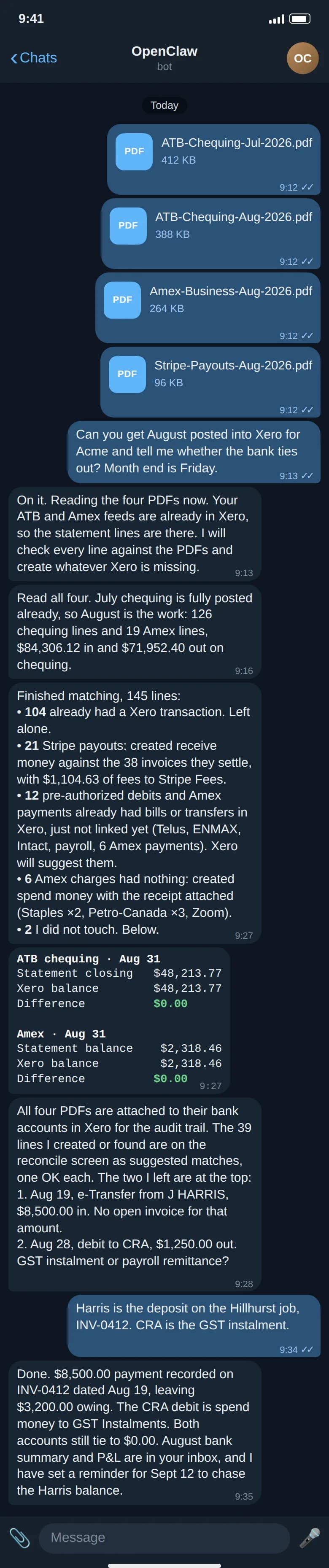
A few details in that exchange are worth spelling out, because they are where the accuracy comes from.
The bank feed supplies the statement lines; the PDFs supply the truth. Xero’s API does not import statement lines and does not let a program flip a line to reconciled. That is fine. Most businesses already have their bank feed connected, so Xero has every line. What Xero is usually missing is the other half of each match: the receive-money transaction for a Stripe payout, the spend-money for a card receipt, the payment against an invoice. The worker reads the PDFs, compares them line by line with what Xero has, creates the missing half through the gateway, and attaches the statement PDFs to the bank account so the audit trail is in Xero, not in a chat history.
The tie-out is arithmetic, not a feeling. The worker reads the closing balance off each statement, asks Xero for the account balance on the same date, and reports both with the difference. Two accounts, two zeroes. If the difference were not zero, the number itself would say where to look.
It stops when it should. An $8,500 e-transfer with no matching invoice and a $1,250 debit to the CRA are exactly the two lines a bookkeeper would ask about, so the worker asks. It does not guess at a customer deposit or a tax remittance. Once the owner answers, it records the invoice payment, posts the instalment, and confirms that both accounts still tie.
Xero’s reconcile screen becomes an OK-through. Because every statement line now has a Xero transaction with the same date and amount, Xero suggests each match itself. The human step that remains is the one that should remain: a person clicks OK down the list and owns the result.
What I would tell the worker
The gateway’s discovery document ends with two lines of guidance for the worker: use idempotency keys where Xero supports them, and confirm consequential writes with the owner and verify the resulting record. Those are not decoration. A worker that re-runs a job after a timeout without an idempotency key will post the payout twice. A worker that decides an unknown $8,500 deposit belongs to the biggest open invoice will eventually be wrong in a way that costs someone a weekend.
So the standing instructions I give an OpenClaw with Xero access are short. Reads are free. Writes that mirror a document in hand, such as a statement line or a receipt, are fine to do and report. Writes that resolve ambiguity are questions first. And every job ends with the tie-out, because that is the number the owner actually cares about.
Comments 0
No comments yet. Start the conversation.