A Vue Directive Worth Reusing: Copy to Clipboard
A copy button looks trivial until the same interaction appears three times. This is the sort of small DOM behaviour a Vue directive handles beautifully: one implementation, ordinary HTML elements, and no throwaway component wrapped around every button.
I wanted a directive demo that was more interesting than autofocus but still small enough to understand in one sitting. The result is v-copy: bind text to any clickable element, write it to the browser clipboard, and optionally react to success or failure.
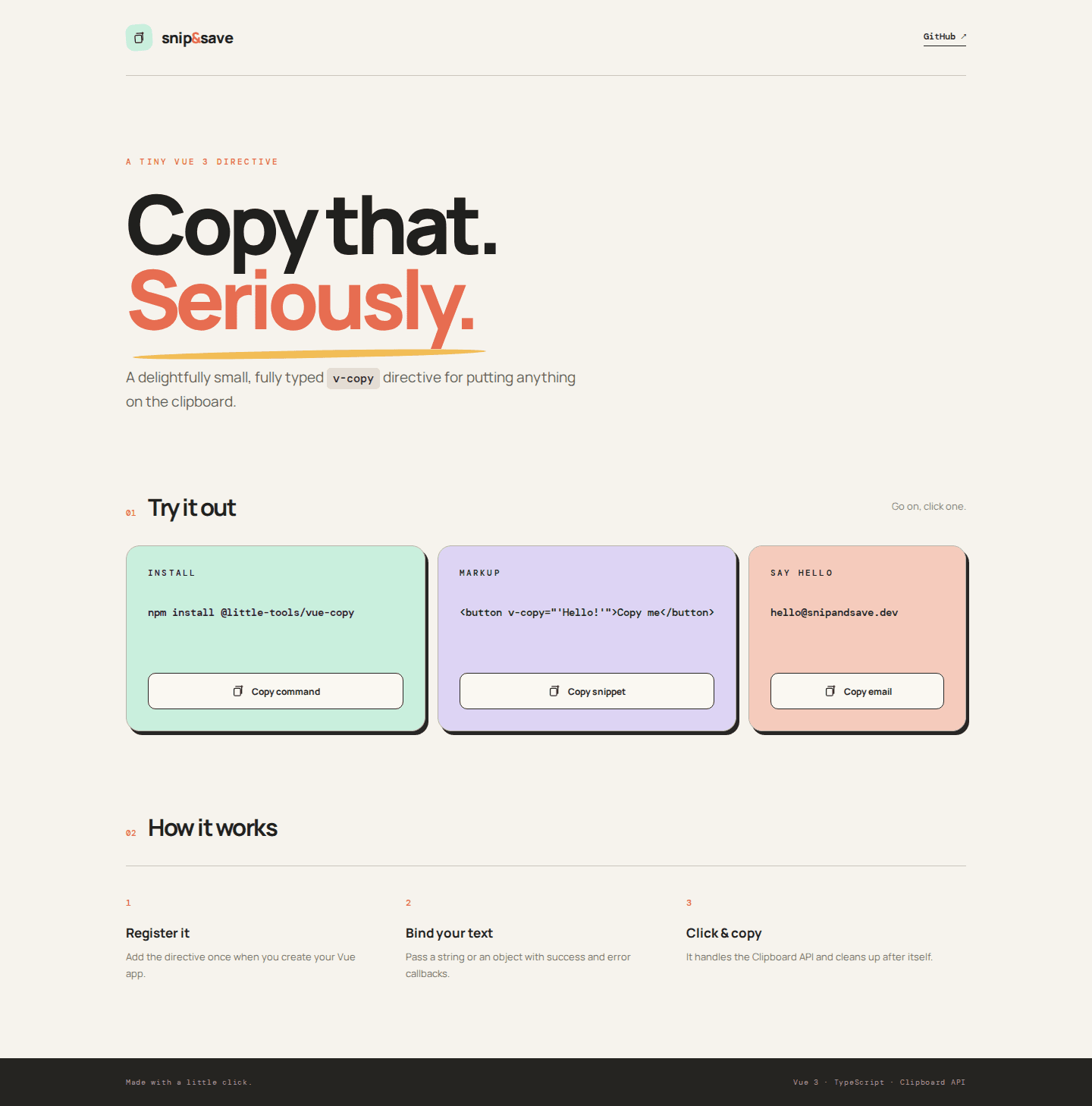
The finished page uses the directive three times—for an install command, a markup snippet, and an email address. Each button owns its label and visual feedback, while the directive owns the browser interaction.
Why this is a directive, not a component
Vue components are the right abstraction when a piece of UI has structure: markup, styling, state, slots, or a meaningful visual identity. A directive is a better fit when reusable behaviour needs direct access to an existing DOM element.
Copying is almost pure behaviour. It adds a click listener, calls the Clipboard API, reports what happened, and removes the listener later. The button can remain a button. It does not need to become a special <CopyButton> component just to gain one capability.
A useful binding without a complicated API
The directive accepts either a string for the small case or an object for the useful case. The object carries the text and optional callbacks. That keeps v-copy="message" pleasant while allowing a page to show a temporary “Copied!” state.
import type { Directive, DirectiveBinding } from 'vue'

interface CopyValue {
  text: string
  onSuccess?: (text: string) => void
  onError?: (error: unknown) => void
}

type CopyBinding = string | CopyValue
type CopyElement = HTMLElement & { __copyHandler__?: () => void }

const resolveValue = (binding: DirectiveBinding<CopyBinding>): CopyValue =>
  typeof binding.value === 'string' ? { text: binding.value } : binding.value

const bind = (element: CopyElement, binding: DirectiveBinding<CopyBinding>) => {
  element.__copyHandler__ = async () => {
    const value = resolveValue(binding)
    try {
      await navigator.clipboard.writeText(value.text)
      value.onSuccess?.(value.text)
      element.dispatchEvent(new CustomEvent('copy-success', { detail: value.text }))
    } catch (error) {
      value.onError?.(error)
      element.dispatchEvent(new CustomEvent('copy-error', { detail: error }))
    }
  }
  element.addEventListener('click', element.__copyHandler__)
}
The callback is not the only integration point. The element also dispatches copy-success and copy-error custom events. A consumer can choose whichever style fits its code without coupling the directive to a toast library or a particular design system.
Lifecycle cleanup is the reusable part
The interesting code is not navigator.clipboard.writeText. It is retaining the exact listener function so Vue can update or remove it safely. Anonymous event handlers are easy to add and impossible to remove unless their reference is saved.
export const copy: Directive<CopyElement, CopyBinding> = {
  mounted: bind,
  updated(element, binding) {
    if (element.__copyHandler__) {
      element.removeEventListener('click', element.__copyHandler__)
    }
    bind(element, binding)
  },
  beforeUnmount(element) {
    if (element.__copyHandler__) {
      element.removeEventListener('click', element.__copyHandler__)
    }
    delete element.__copyHandler__
  },
}
On an update, the old listener is removed before a new closure captures the newest binding. Before unmounting, the listener and the private property are both cleared. That prevents duplicate copies after reactive updates and prevents detached elements from keeping unnecessary references alive.
Use it more than once
A reusable feature should be demonstrated under reuse. The page binds independent values and callbacks to several buttons:
<button
  v-copy="{ text: npmCommand, onSuccess: () => celebrate('npm') }"
>
  Copy command
</button>

<button
  v-copy="{ text: email, onSuccess: () => celebrate('email') }"
>
  Copy email
</button>
The feedback state belongs to the page because “what should success look like?” is a presentation decision. The clipboard operation belongs to the directive because it is stable DOM behaviour. That boundary keeps both pieces small.

Unit-test behaviour, then browser-test reality
Jest and Vue Test Utils cover the directive as a unit. The Clipboard API is mocked, which makes success, failure, reactive updates, emitted events, and unmount cleanup deterministic. The update test is particularly valuable because a stale closure would otherwise be an easy bug to miss.
it('uses the latest reactive binding value after an update', async () => {
  const message = ref('first')
  const wrapper = mountCopy(
    () => ({ message }),
    '<button v-copy="message">Copy</button>',
  )

  message.value = 'second'
  await nextTick()
  await wrapper.trigger('click')

  expect(writeText).toHaveBeenCalledTimes(1)
  expect(writeText).toHaveBeenCalledWith('second')
})
That mock cannot prove a real browser will grant clipboard permission or that three controls copy three distinct values. Playwright covers that boundary in Chromium. It grants clipboard permission, clicks each control, reads navigator.clipboard.readText(), and asserts on the actual clipboard contents.
The repository’s GitHub Actions workflow runs both layers on every pull request and push to main: five Jest tests, four Playwright tests, and the production TypeScript build. The workflow badge in the README links to the latest result instead of preserving a screenshot of a result that can go stale.
The whole example
The complete project includes the responsive demo, the inline clipboard-and-sparkle SVG icon, Jest configuration, Playwright configuration, generated README screenshots, and the GitHub Actions workflow.
github.com/8exgh/vuejs-directive →
The lesson is deliberately small: directives are at their best when the UI should remain ordinary and only the DOM behaviour deserves a name. v-copy gives that behaviour one tested home and lets every button keep being itself.
Comments 0
No comments yet. Start the conversation.