How I Built a Daily Tip System for My OpenClaw Fleet
One useful idea in the morning, delivered by the claw the owner already talks to. Behind that small interaction: a researched catalog, a saved place in the series, and a careful answer to what happens when a send might have succeeded.
A capable assistant is only useful if its owner knows what to ask it to do. Someone might use their OpenClaw for questions every day without realizing they can ask it to open a remote browser for a website login, open a remote terminal, or put a finished document in shared files.
I wanted to introduce those possibilities gradually. Each claw would send its owner one short tip every morning, move to the next tip the following day, and cycle back to the beginning after the last one. The tip needed a concrete thing to try, and the owner needed an easy way to pause it.
The result is a library of 180 tips and a small Python background processor. At rollout, it covered 12 active claws: five with verified Telegram owner routes and seven using their private website chat. New assignments are discovered automatically.
Start with something worth receiving
I reviewed both the 8Examples website and the managed OpenClaw repository, alongside the official OpenClaw documentation. That distinction matters: the remote browser handoff, remote terminal, and shared-files interface are features of my managed deployment. An upstream feature being documented does not mean every claw has the necessary connection or helper installed.
The catalog has 12 categories with 15 tips in each. They cover chat interfaces, browser work, terminals, shared files, delegation, memory and preferences, scheduling, email and communication, research, documents and data, websites and writing, and everyday tasks. Categories alternate through the sequence, so an owner does not get two weeks of terminal advice in a row.
I put Telegram, remote browser login, the remote terminal, and shared files among the first four entries. They are useful ways into the product, and they give owners something specific to ask for.
The terminal tips explain the private link and connection code, how to finish with End terminal, and how to hand the task back. The shared-files tips show owners where to upload inputs, retrieve deliverables, organize versions, and request an expiring or password-protected share link.
Each catalog entry has a stable ID, category, title, short explanation, suggested prompt, and research reference. Some also name a required workspace helper or provide alternate introductory wording when setup is missing. The worker sends this reviewed text directly. It does not ask a model to invent a fresh tip every morning.
Give the schedule a clear owner
There was already a suggestion queue in the managed workspace. A heartbeat could pick up a pending nudge when the moment seemed suitable. That was useful for an occasional suggestion, but it could defer a message indefinitely. A predictable morning series needed a clock and durable progress.
OpenClaw has its own automation scheduler. For this feature, I chose a host-level worker because my fleet also uses an external Rocket.Chat bridge, and I wanted one place to manage enrollment, delivery history, and content across both routes.
A systemd timer starts the worker every minute. The worker reads the current tenant registry, excludes unassigned inventory and offboarded claws, checks that the container is running, and evaluates the owner's local schedule. The implementation uses Python's standard library, including SQLite and IANA timezone support.
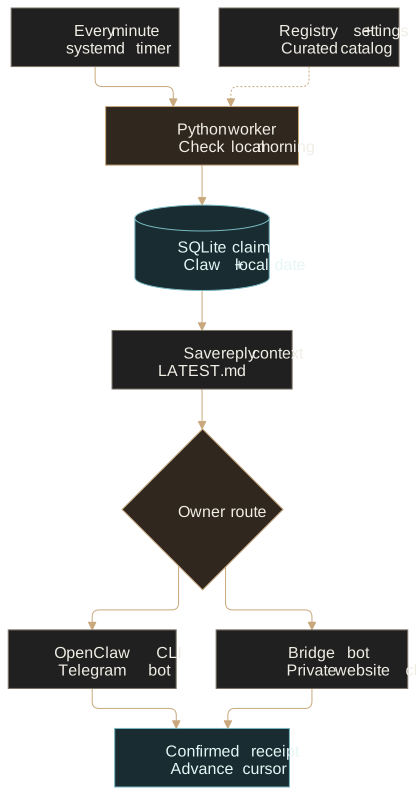
The default is 9:00 a.m. Timezone selection follows an explicit order: the tip settings, then OpenClaw's configured user timezone, then America/Edmonton. A two-hour window allows a temporarily unavailable claw to recover during the morning. After that, the day is skipped. Coming back online in the evening does not trigger a backlog.
There is also a minimum of 20 hours between confirmed deliveries. The local-date key alone would not prevent two closely spaced messages if an owner changed timezones. This extra check handles that case, with the tradeoff that a timezone change can cause a morning to be skipped.
Remember the last confirmed tip
Every claw has its own cursor: the stable ID of the last tip whose delivery was confirmed. The next run starts after that entry and wraps to the beginning when it reaches the end of the catalog. A missed day leaves the cursor where it was.
The catalog is shared, but eligibility is evaluated for each claw. If an advanced terminal tip requires a helper that is absent, the worker skips it. A feature introduction can instead explain what is available when enabled and suggest checking setup. This mattered during rollout: terminal access was not installed on most claws, and one lacked shared files.
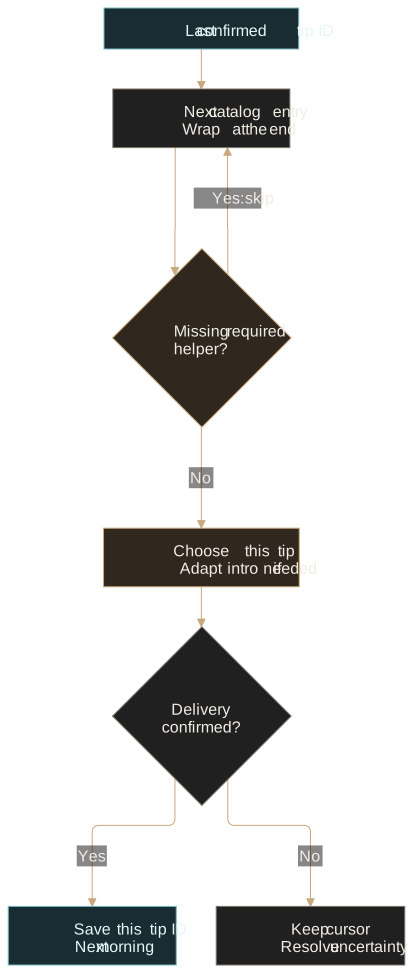
Stable IDs are part of the persistence contract. I can edit wording without losing the saved position, but I should not rename or reuse an ID casually. In this implementation, removing the entry a cursor points to makes selection restart at the beginning. Catalog maintenance needs to account for that behavior.
Record the claim before sending
The important failure is easy to describe: the provider accepts the message, then the worker stops before recording success. On the next run, sending again might deliver the same tip twice.
I used a local SQLite ledger with write-ahead logging and synchronous=FULL. A process lock keeps two workers from competing, and a unique key on (tenant, day) protects each local day. Before contacting the provider, the worker commits a row containing the exact message, chosen route, tip ID, and a sending status.
# Simplified ordering; the database claim is committed first.
claim(tenant, local_day, tip_id, message, route)
save_reply_context(message)
receipt = send_through_existing_chat(route, message)

# One transaction records success and moves the cursor.
record_sent_and_advance_cursor(receipt)
The recipient comes from verified configuration. For Telegram, the registry and runtime allowlist must agree on one private owner. Wildcards, group targets, and ambiguous account configurations do not qualify for automatic selection. Otherwise, the worker verifies the existing private website-chat room and the expected owner and bridge-bot membership. Owners can choose between those supported routes, but the tip settings do not accept an arbitrary recipient.
A nonzero CLI exit, timeout, or missing receipt is not enough evidence that nothing arrived. The worker records an uncertain outcome and holds that claw's series. It does not automatically resend or switch to the other channel.
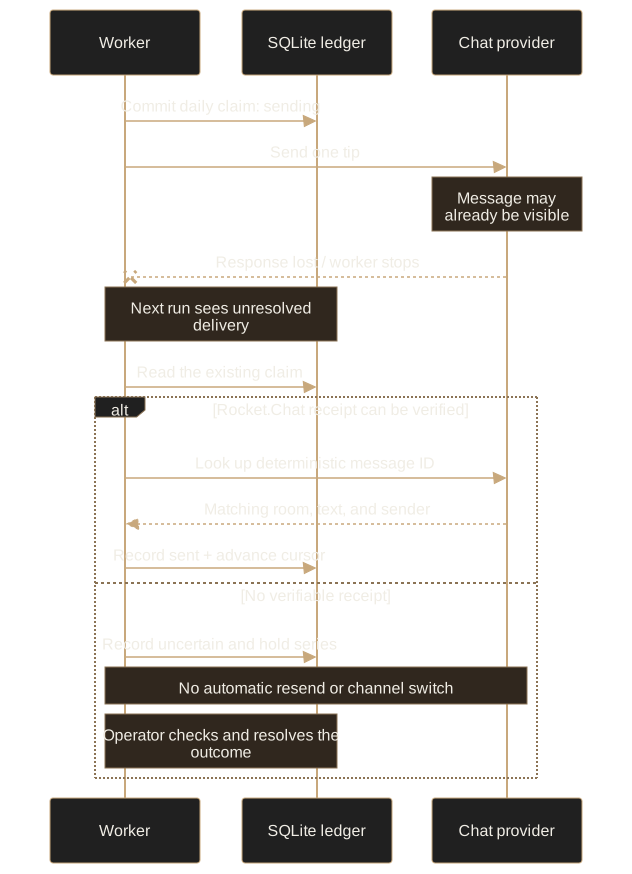
Rocket.Chat's chat.sendMessage endpoint accepts a message ID, so I derive one from the claw and local date. Recovery can look up that ID and verify the room, text, and sender before marking the delivery sent without resending it.
The Telegram integration does not give this worker an equivalent way to prove the outcome of an unknown send. That case stays held for operator review. The operator can record a verified delivery or a verified non-delivery; the recovery command itself sends nothing. Only a confirmed delivery advances the cursor.
This is a deliberate availability tradeoff. I am not claiming exactly-once delivery through arbitrary provider failures. A claw can miss tips while an uncertain result waits for review. The worker exposes that state in its status file and service logs, exits nonzero for unresolved uncertainty, and continues processing other claws.
Make the tip part of a usable conversation
Sending a message is only half the interaction. If the owner replies, “Let's do that,” the claw needs to know which tip they mean. Before delivery, the worker writes the exact tip to daily-tips/LATEST.md, along with its date and status. A small workspace instruction block tells the claw to read that file for replies about the tip.
The same instructions explain owner controls. “Pause daily tips” means saving enabled: false in daily-tips/settings.json, then confirming the change. Resuming sets it back to true. The owner can also change the time, timezone, or supported delivery channel.
{
  "enabled": true,
  "time": "09:00",
  "timezone": "America/Edmonton",
  "channel": "auto"
}
Changes take effect on the next poll; an already in-flight message can finish. The old promotional heartbeat nudges are suppressed for enrolled claws, including while tips are paused. Requested reminders and genuine commitments remain separate. A tip is an invitation to ask for help, not permission for the assistant to start the suggested task on its own.
The installer preserves existing workspace text and saves the originals before adding its marked instructions. Settings are created only if absent. File operations reject symbolic-link traversal, use atomic writes, and check for a changed original before replacing it. The durable delivery ledger stays outside the owner-editable workspace.
Test the interruptions, then the real messaging code
The processor suite had 31 tests at rollout. They covered timezone boundaries and daylight-saving changes, pause and resume, the end of the cycle, missing capabilities, new assignments, offline claws, concurrent workers, and ownership or settings changing during delivery preflight.
The most useful process test ran the actual worker against a local fake chat server. The server accepted a message, the test killed the worker, and the next process recovered the matching receipt. The send count stayed at one. Another process started while the first held the lock and correctly declined to compete.
I also exercised both OpenClaw runtime images used by the Telegram claws. Each rehearsal booted the real gateway and message CLI in a disposable container, with synthetic credentials, a loopback fake Telegram API, and external networking disabled. It checked one synthetic send and parsed the actual receipt. Customer data and live bot credentials were not mounted.
The managed repository's 111-test suite and TypeScript check passed as well. That is 142 tests across the two suites, plus the runtime rehearsals. Those are qualification checks for this implementation, not a guarantee that a future provider outage cannot affect delivery.
Enroll the current fleet and the next claw
I started with a read-only route audit, then enrolled one canary. The canary's existing instructions remained intact, a pre-9:00 run stayed quiet, and an isolated read-only agent check correctly identified both the pause setting and the rule against sending old promotional nudges.
After that, I enabled the host timer for all 12 active claws. All delivery routes validated, and the containers remained healthy without a container or browser restart. Those rollout checks established readiness; they were not a claim that every owner had already received a tip.
There is no separate per-claw scheduling step to forget during signup. Each poll reads the registry again, so a newly assigned, running claw can enroll and receive its first tip in an eligible window. Unassigned inventory and offboarded claws are skipped. The ordinary fleet deployment installs the service as well.
The useful product behavior stays small: one practical idea, in the chat the owner already uses, with a prompt they can try and a way to pause. The saved cursor, recipient checks, and recovery rules are what let that behavior continue as the fleet changes.
Comments 0
No comments yet. Start the conversation.