How I Built Meta Glasses Support for OpenClaw
I wanted to say “OpenClaw, …” through my glasses, give my existing assistant a job, and receive a short update when it finished. The implementation adds a Glasses tab to the iPhone app I already had, backed by one new relay on the fleet host.
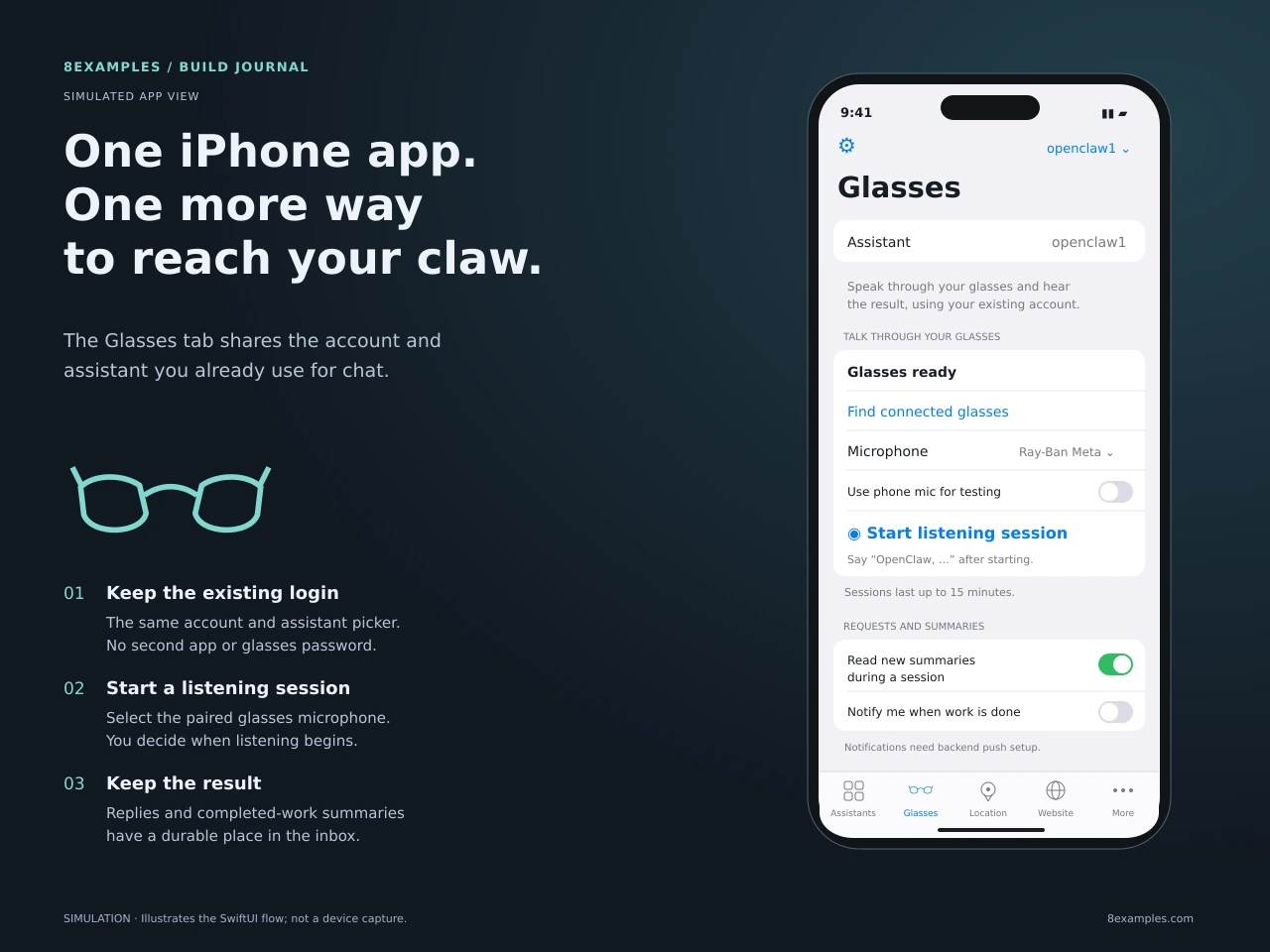
OpenClaw already had the useful part: an assistant with its own tools, conversations, and place in my hosted fleet. The glasses needed a way to reach that assistant and a way to tell me what happened. That gave the project two concrete flows: spoken requests going in, and completion summaries coming back.
The first design decision was to keep one iPhone app. Chat, location, website, phone, and connection features were already there. A separate glasses app would have introduced another login, another assistant selection, and another place for those choices to disagree. The Glasses feature now shares the existing app model and app identity.
The glasses provide the microphone and speakers
This integration uses the glasses as a paired Bluetooth audio device. Meta documents microphone and speaker access through the phone’s Bluetooth profiles in its wearables FAQ. The iPhone handles speech recognition, the network request, and speech playback.
For this audio path, I did not need to add a Meta Device Access Toolkit binary. The implementation does not use the camera or a glasses display. Those would be separate features with their own access requirements. The hardware is paired through the Meta app and the iPhone’s Bluetooth settings; the Glasses tab then selects its microphone.
Apple’s speech recognizer turns an addressed utterance into text. The implementation prefers on-device recognition when available, but can use the recognizer’s network path. The relay receives the resulting text, rather than a continuous raw audio stream. That distinction matters when describing where the audio goes: this is not a promise that all speech processing happens offline.
An explicit listening session
The interaction begins in the iPhone app. I select an assistant, find the connected glasses, and tap Start listening session. During that session, an addressed request such as “OpenClaw, summarize my project updates” is collected and sent after a short pause. The current quiet-period threshold is 1.4 seconds.
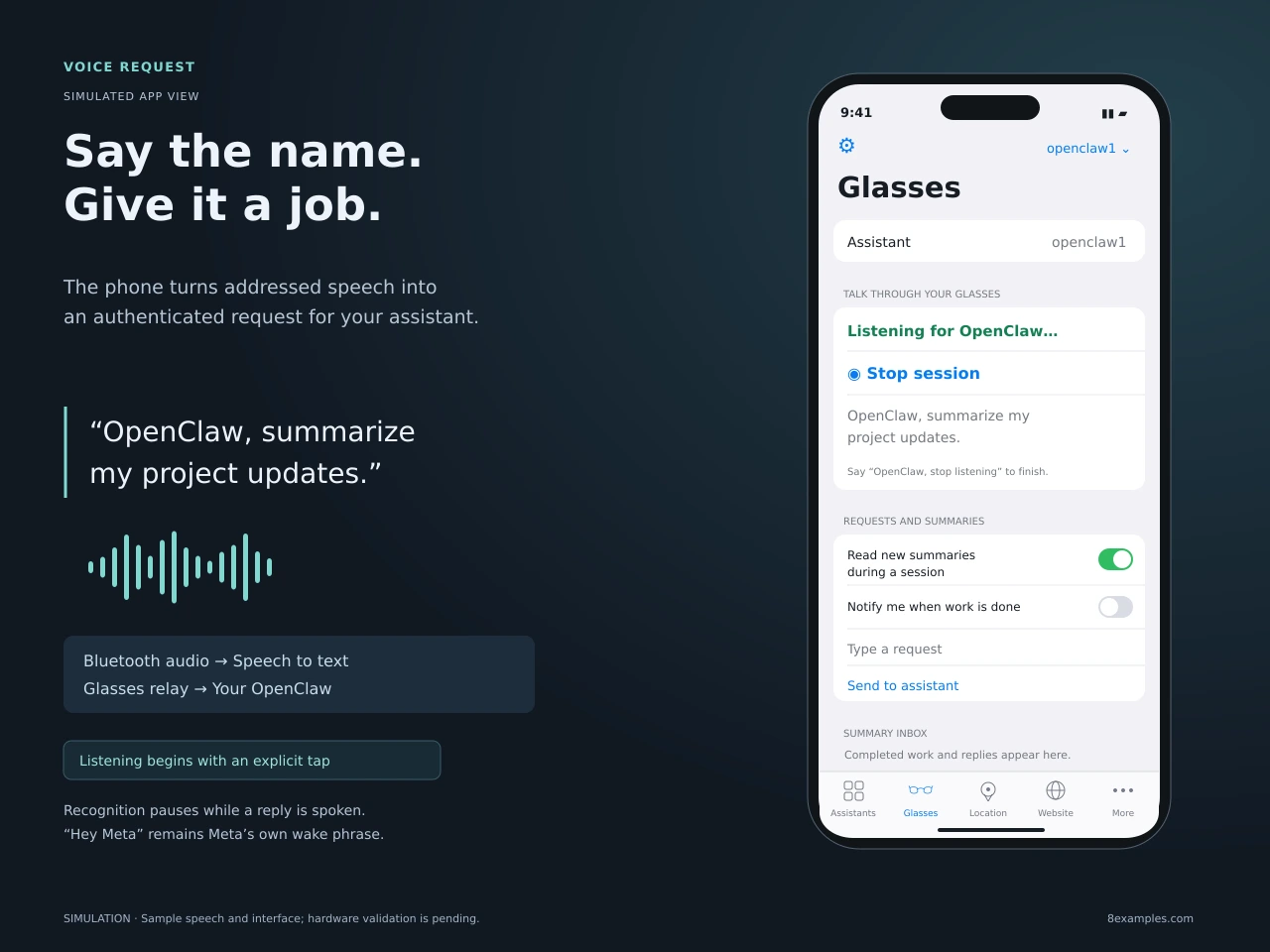
The session has a 15-minute limit. A Bluetooth disconnect or audio interruption stops listening, and the app pauses recognition while speaking a reply so it does not hear its own response as another instruction. There is also a spoken “OpenClaw, stop listening” command. The phone microphone is an explicit testing option.
“Hey Meta” remains Meta’s wake phrase. Saying “OpenClaw” does not launch a terminated iPhone app or remotely activate its microphone. Locked-phone behavior still needs testing on the actual iPhone and glasses. The implemented experience depends on starting a listening session and keeping an available audio route.
The architecture: one app, one new backend
The new service lives in openclaw-meta-glasses/. It is a Node.js and Fastify relay on the same fleet host as the existing OpenClaw containers. SQLite stores requests, inbox events, and notification retries. The existing website remains the account authority.
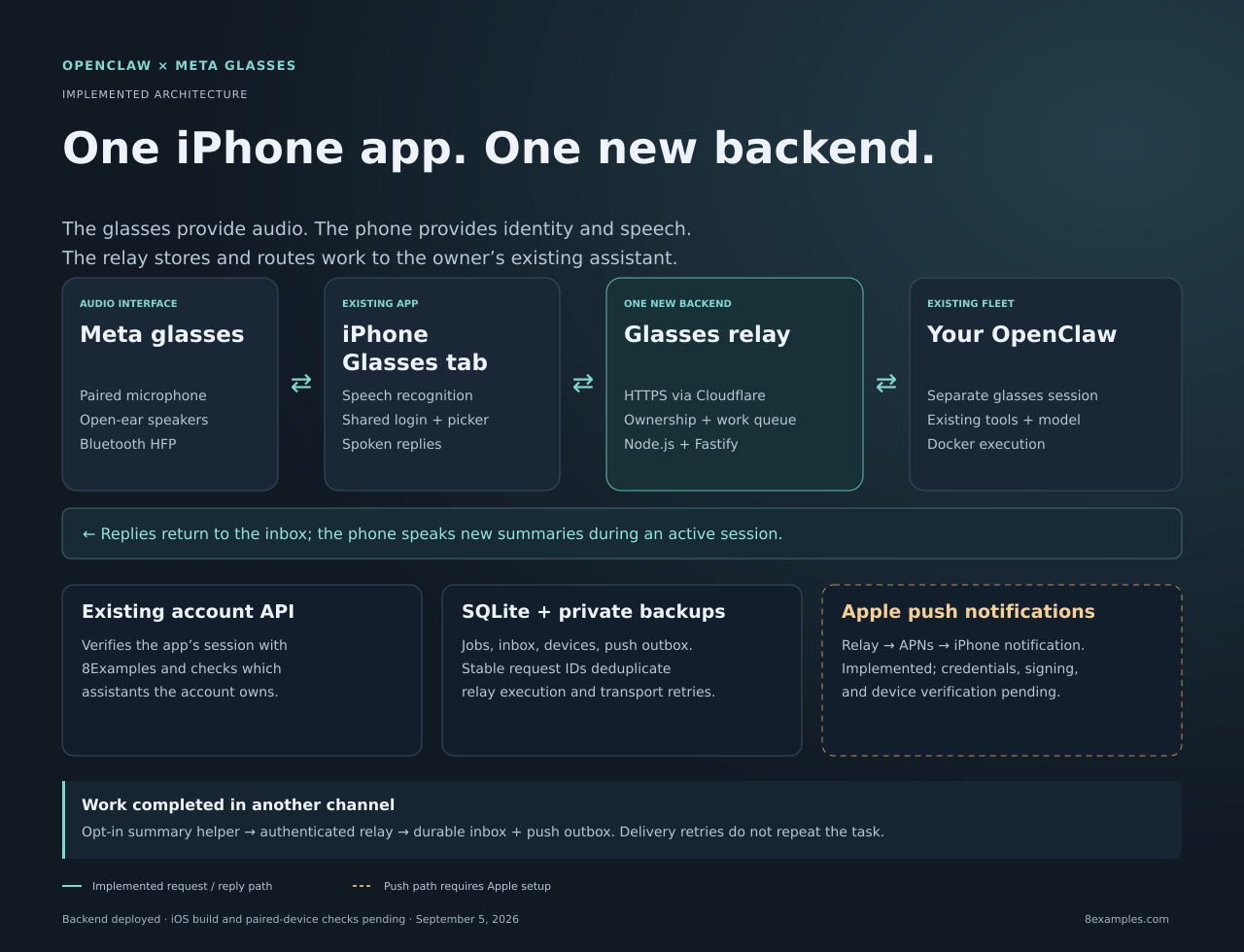
- The phone identifies the owner. Glasses uses the existing mobile login and shared assistant picker. The relay checks that session with the account API and verifies ownership of the requested claw.
- The relay saves the request. An authenticated text request carries a stable request ID. The relay persists it before a worker executes it.
- The existing assistant does the work. The worker invokes the selected OpenClaw container through Docker, using a separate
glasses:<claw>:<owner>conversation. Its existing tools and model configuration still apply. - The reply becomes an inbox event. The final response is stored, and notification delivery is queued separately. During an active session, the phone can read the new summary through the glasses.
The OpenClaw invocation omits --deliver, because this relay owns delivery of that reply. That avoids also asking OpenClaw to send it through another channel. The Docker connection stays on the fleet host; the mobile API exposes authenticated requests, not a general container-control interface.
Sharing the app model also makes account changes explicit. Signing out stops listening. Switching assistants invalidates stale in-flight UI work, and a saved retry remains associated with the assistant that originally received it. An update arriving for one claw must not appear as work done by whichever claw happens to be selected now.
A dropped connection must not repeat the job
Voice makes it easy to issue work while a phone is moving between networks. If a connection drops after the server accepts a request, the app may not know whether anything happened. Sending the same instruction as a brand-new job could repeat an external action.
The phone therefore keeps a stable request ID for transport retries, scoped to the owner, relay, and assistant. SQLite tracks the request through queued, running, and completed states. Retrying an accepted ID recovers the existing request instead of starting fresh execution.
There is also an uncertain outcome. If execution times out or the relay restarts while work is running, the service does not assume that nothing happened and automatically run the action again. The owner needs to inspect the outcome before issuing a new instruction. This is a deliberate limit: request deduplication cannot guarantee exactly-once effects inside every external tool.
The inbox connects requests and completed work
There are two ways a summary reaches the owner. A request made through Glasses automatically produces an inbox reply when the assistant finishes. Work initiated somewhere else, such as Telegram or a scheduled task, can publish a completion summary through an opt-in tenant capability.
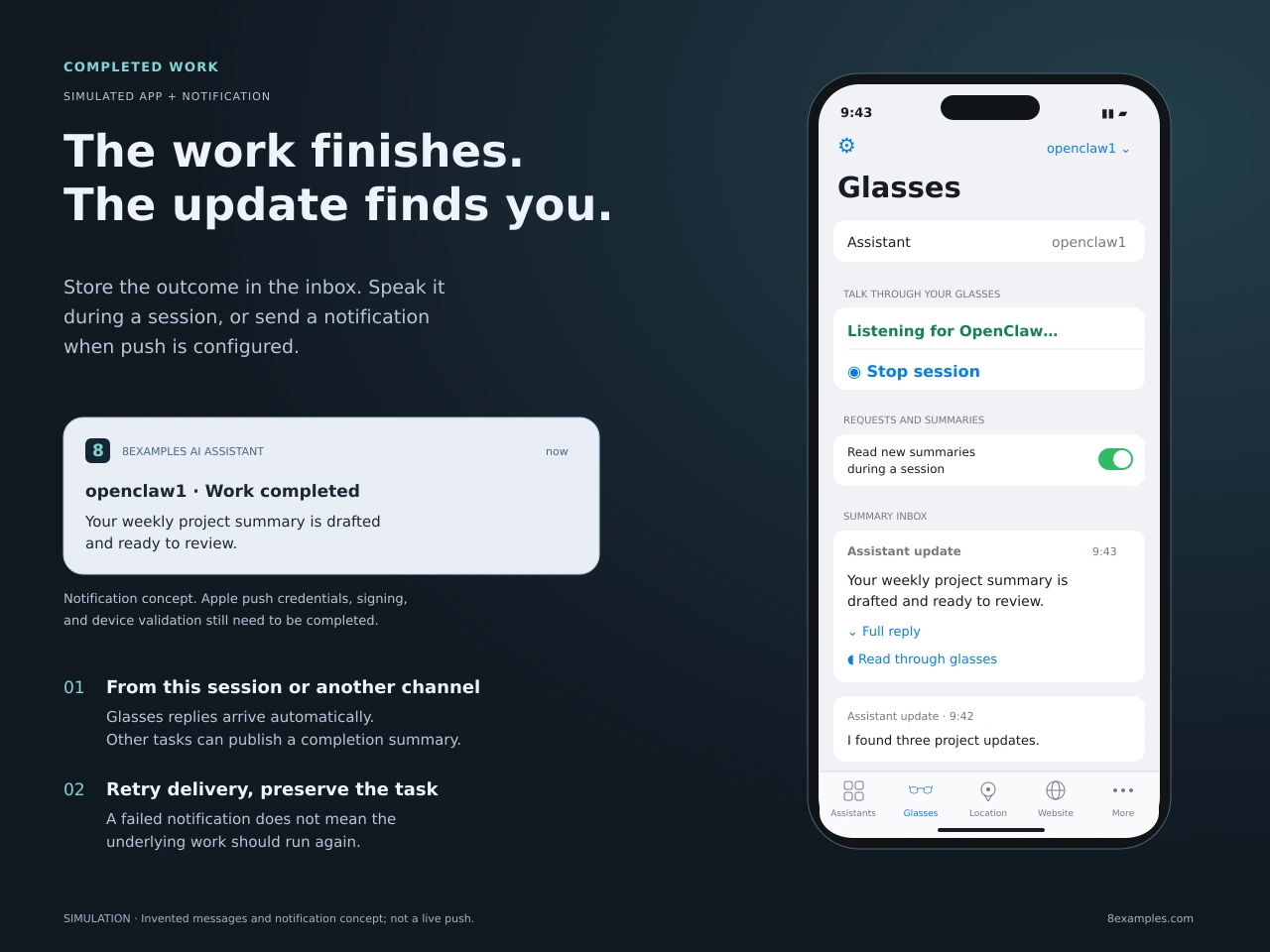
For that second path, the assistant writes a short summary and invokes a managed helper. The helper reads its per-tenant publisher credential from the environment. The message includes a stable action ID, a summary of up to 400 characters, and optional supporting detail. Publishing identical content again with the same action ID returns the same inbox event.
The summary instructions ask for verified outcomes. “Your draft is saved and ready to review” is useful when a draft was actually saved. A message should not claim that something was sent, booked, or deployed merely because the assistant attempted it. Failure to publish a summary also must not cause the assistant to repeat the underlying job.
This capability still needs to be enabled for the live tenant. It is separate from replies to Glasses requests, so adding a mobile voice interface does not automatically turn every conversation into a notification feed.
Push delivery has its own retry queue
The durable inbox is the record of what happened. Push is a way to draw attention to it. The relay saves a notification outbox entry separately from the completed job, so an Apple push failure does not erase the reply or rerun the assistant.
The provider implements APNs authentication, delivery retries with backoff for up to 24 hours, and ownership checks before delivery. The app registers its device token and can route a tapped notification to the corresponding assistant’s Glasses inbox. Receiving a foreground banner alone does not change the selected assistant.
APNs credentials, provisioning, and real-device delivery are still pending. The relay’s push environment must match the installed app: sandbox for the Debug device build, production for Release or TestFlight. Apple describes the two sides in its documentation on registering an app with APNs and sending notification requests.
During an active listening session, new summaries can be spoken through the glasses. Outside that session, the planned delivery is an iPhone notification once push is configured. Automatic spoken announcements through inactive glasses are not something this implementation guarantees.
Deploying beside the existing fleet
The relay is deployed at glasses.fusenv.com. Its container binds to the fleet host’s loopback interface on port 8795. Cloudflare Tunnel provides the public HTTPS route, preserving the host’s other existing routes.
I added GitHub Actions workflows for configuring the Cloudflare route and deploying the backend. They live in the existing operations repository, where the fleet runner and deployment credentials already live. The backend workflow builds and starts the service, checks its health, and installs the backup timer.
Daily backups retain 14 days of private archives. Each archive includes a consistent SQLite snapshot together with the configuration and encryption key needed to read its persisted sessions. APNs key files will join those backups once configured. A production archive was restored into a temporary database and passed checksum and database-integrity checks.
The September 5 verification covered 20 fleet tests, 10 relay tests, and two backup tests. The public health endpoint returned HTTP 200, and an unauthenticated request to the identity endpoint returned HTTP 401. Those checks establish that the service is deployed and its tested backend behavior works. Native build and physical-device behavior remain separate checks.
What remains before using it every day
| Part | Status |
|---|---|
| Relay, HTTPS, backups | Deployed and verified |
| Shared iPhone Glasses tab | Implemented; Xcode build and native tests pending |
| Completion push | Implemented; APNs credentials, signing, and device checks pending |
| Other-channel summaries | Implemented; tenant capability still needs enabling |
| Paired glasses | Audio routing, interruptions, locked-phone use, and playback need physical testing |
The remaining checklist is in todo-meta-glasses.md. It includes the existing Xcode project, push setup, tenant connection, and checks for retries, account switching, and sign-out. The implementation is documented in the backend directory and iPhone app directory.
The part I most wanted to preserve was continuity: the assistant I reach through my glasses should be the same assistant I already use on my phone and through other channels. Keeping one app, one account selection, and a durable inbox gives the new voice interface a clear place in that system.
Related: how I host the OpenClaw fleet and the shared model gateway behind it.
Comments 0
No comments yet. Start the conversation.